JWT Attacks
advanced-> JWTs are most commonly used in authentication, session management, and access control mechanisms, these vulnerabilities can potentially compromise the entire website and its users.
->JSON web tokens (JWTs) are a standardized format for sending cryptographically signed JSON data between systems. They can theoretically contain any kind of data, but are most commonly used to send information (“claims”) about users as part of authentication, session handling, and access control mechanisms.
-> All of the data that a server needs is stored client-side within the JWT itself. This makes JWTs a popular choice for highly distributed websites where users need to interact seamlessly with multiple back-end servers.
A JWT consists of 3 parts:
- a header,
- a payload, and
- a signature.
JWT vs JWS vs JWE
The JWT spec is extended by both the JSON Web Signature (JWS) and JSON Web Encryption (JWE) specifications, which define concrete ways of actually implementing JWTs.
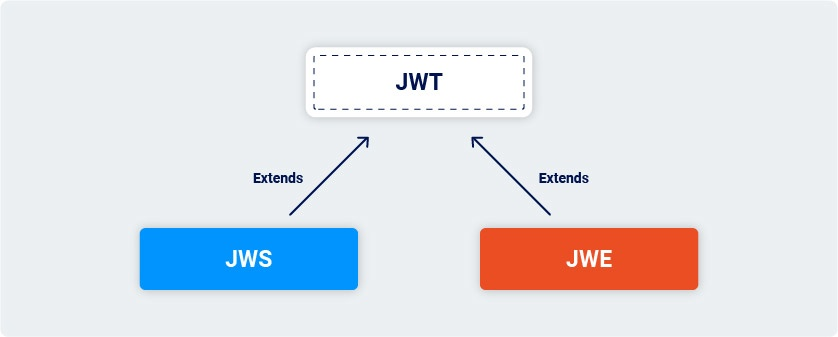
In other words, a JWT is usually either a JWS or JWE token. When people use the term “JWT”, they almost always mean a JWS token. JWEs are very similar, except that the actual contents of the token are encrypted rather than just encoded.
What are JWT attacks?
->JWT attacks involve a user sending modified JWTs to the server in order to achieve a malicious goal. Typically, this goal is to bypass authentication and access controls by impersonating another user who has already been authenticated.
->Some signing algorithms, such as HS256 (HMAC + SHA-256), use an arbitrary, standalone string as the secret key. Just like a password, it’s crucial that this secret can’t be easily guessed or brute-forced by an attacker. Otherwise, they may be able to create JWTs with any header and payload values they like, then use the key to re-sign the token with a valid signature.
LIST OF PAYLOADS FOR JWT SECRET KEY:
https://github.com/wallarm/jwt-secrets/blob/master/jwt.secrets.list
To crack the secret-key:
USE,
You just need a valid, signed JWT from the target server and a wordlist of well-known secrets. You can then run the following command, passing in the JWT and wordlist as arguments:
hashcat -a 0 -m 16500 <jwt> <wordlist>
If you run the command more than once, you need to include the --show flag to output the results.
JWT header parameter injections
JWT header parameters define the metadata of a JSON Web Token (JWT). The header typically includes the token type, the signing algorithm, and other optional parameters like the key ID, JSON Web Key (JWK) URL, or Content Type.
Here’s a breakdown of common JWT header parameters:
1. alg (Algorithm):
- Specifies the cryptographic algorithm used to sign or encrypt the JWT.
- Examples include
HS256(HMAC with SHA-256),RS256(RSA with SHA-256),none(for unsigned JWTs).
2. typ (Type):
- Indicates the media type of the token, typically set to
JWT. - Example:
"typ": "JWT".
3. cty (Content Type):
- Specifies the content type of the JWT, usually used for nested JWTs (JWTs within JWTs).
- Example:
"cty": "JWT".
4. kid (Key ID):
- Provides a hint to identify the specific key used to sign the JWT, especially when multiple keys are available.
- Provides an ID that servers can use to identify the correct key in cases where there are multiple keys to choose from. Depending on the format of the key, this may have a matching
kidparameter. - Example:
"kid": "2010-12-07".
5. jku (JWK Set URL):
- Specifies a URL that provides a set of JSON Web Keys (JWKs).
- Provides a URL from which servers can fetch a set of keys containing the correct key.
- The recipient can use this URL to retrieve the key needed to verify the JWT.
6. jwk (JSON Web Key):
- Provides the key used to sign the JWT directly within the header as a JSON object.
- Provides an embedded JSON object representing the key.
- This is less common than using
jkuorkid.
7. x5u (X.509 URL):
- Specifies a URL that provides the X.509 public key certificate or certificate chain.
8. x5c (X.509 Certificate Chain):
- Provides the X.509 public key certificate or certificate chain directly in the header.
9. x5t (X.509 Certificate Thumbprint):
- Provides the base64url-encoded SHA-1 thumbprint (a hash) of the DER encoding of the X.509 certificate.
10. x5t#S256 (X.509 Certificate Thumbprint Key):
- Provides the base64url-encoded SHA-256 thumbprint of the DER encoding of the X.509 certificate.
How to prevent JWT attacks
You can protect your own websites against many of the attacks we’ve covered by taking the following high-level measures:
-
Use an up-to-date library for handling JWTs and make sure your developers fully understand how it works, along with any security implications. Modern libraries make it more difficult for you to inadvertently implement them insecurely, but this isn’t foolproof due to the inherent flexibility of the related specifications.
-
Make sure that you perform robust signature verification on any JWTs that you receive, and account for edge-cases such as JWTs signed using unexpected algorithms.
-
Enforce a strict whitelist of permitted hosts for the
jkuheader. -
Make sure that you’re not vulnerable to path traversal or SQL injection via the
kidheader parameter.